
Project Status Reporting Guide for Team Leaders
Project Status Reporting Guide for Team Leaders
Fifty1 Consulting ·

TL;DR:
- Effective project status reports, tailored to stakeholders’ needs and structured around clear, concise updates, are essential for building trust, enabling quick decisions, and preventing crises. Consistent reporting using frameworks like Done, Doing, Blocked, Needs, supported by visuals and specific asks, streamlines communication and improves accountability. Avoid common mistakes such as vague labels, excessive detail, or irregular updates, which undermine credibility and decision-making. Prioritizing transparency and focusing on changes since the last update are key to efficient project oversight. Cultivating these skills transforms reports into powerful leadership tools that facilitate successful project delivery.
Your project is three weeks from go-live. The steering committee thinks things are green. Your team knows they’re red. Nobody wrote it down. That’s not a communication style difference. That’s a ticking clock. A solid project status reporting guide closes that gap before it becomes a post-mortem. Poor visibility into project health doesn’t just frustrate stakeholders. It costs real money and burns real trust. This article walks you through what to prepare, how to write reports that drive decisions, and what mistakes are quietly wrecking your credibility right now.
Key takeaways
| Point | Details |
|---|---|
| Know your audience first | Tailor content by stakeholder type. Executives want outcomes; engineers want technical detail. |
| Use a focused report structure | The Done, Doing, Blocked, Needs format keeps reports scannable and decision-ready. |
| Report on change, not history | Cover only what shifted since the last update. Full project recaps kill clarity. |
| Vague status labels are a trap | “On track” without context tells nobody anything useful. Always add risk and blocker detail. |
| Consistency beats perfection | A reliable weekly cadence reduces ad hoc check-ins and builds stakeholder trust over time. |
What you need before writing a single report
Think of this section as mise en place. Before a chef touches the stove, everything is prepped and in its place. Status reporting works the same way. If you sit down to write without the right inputs, you’ll produce something that looks like a report but reads like a press release, vague, polished, and useless.
Start with your project goals and milestones. You can’t report on progress if you haven’t defined what progress looks like. Map your milestones clearly and tie each status update back to them. Reporting project milestones isn’t optional. It’s the backbone of any credible status update.
Know exactly who you’re reporting to. This is where most project managers fall short. Adjusting content and tone for executives versus engineering teams increases report effectiveness significantly. An executive wants to know if the project will ship on time and within budget. Your lead developer wants to know which blockers are affecting their sprint. One report rarely serves both. Tailor accordingly or create two versions.
Here’s what you need to pull together before each reporting cycle:
- Progress data: Completed tasks, milestone status, and percentage complete against the plan
- Budget status: Actuals versus forecast, with a note on variance trends
- Risk register: Updated list of active risks, probability, and mitigation steps
- Blocker log: What’s stalled, who owns it, and when resolution is expected
- Resource availability: Any changes to team capacity that affect delivery
Pro Tip: Set a recurring 15-minute block before each report is due to pull these inputs. Chasing data the day of is how you end up with stale numbers and guesswork.
Finally, lock in your cadence before you start. Weekly reporting is the standard for most technology projects. Bi-weekly works for slower moving initiatives. Whatever you choose, stick to it. Predictability in reporting is more valuable than you think. Standardized weekly updates create predictable communication rhythms that save time for everyone.
How to build a report that actually drives decisions
Generic advice says “keep it concise.” Here’s what that actually looks like in practice.
The most effective structure for effective project status updates follows a clear four-part framework:
- Done: What was completed since the last report. Not since the project started. Since the last report.
- Doing: What’s actively in progress right now, with the expected completion date.
- Blocked: What cannot move forward and why. Name the blocker specifically.
- Needs: What decision, approval, or resource is required, and by when.
The Done, Doing, Blocked, Needs format is specifically designed to help leaders make quick, informed decisions without scheduling another meeting. That’s the goal. Every element of your report should serve that goal or get cut.
Writing the executive summary
Your executive summary should be six sentences. That’s not arbitrary. Six-sentence summaries provide enough context for high-level stakeholders without triggering the “this is too long, I’ll read it later” reflex. Cover overall health, key progress this cycle, top risk, current blockers, and what you need from leadership. Done.
Using visuals without overdoing it
A well-placed table or chart communicates faster than three paragraphs of explanation. Use a RAG (Red, Amber, Green) status table to give stakeholders an instant health check across workstreams. Visual tools like boards and charts help teams see progress and improve accountability. Here’s a simple example of what a RAG workstream table looks like:
| Workstream | Status | Key Update | Blocker |
|---|---|---|---|
| Development | 🟢 Green | Sprint 4 complete | None |
| QA | 🟡 Amber | Delayed by 2 days | Resource gap |
| Infrastructure | 🔴 Red | Cloud migration stalled | Vendor approval pending |
| Stakeholder sign-off | 🟢 Green | Sign-off received | None |
Pro Tip: Don’t dump every project detail into a dashboard and call it a status report. Pick the three metrics your stakeholders actually make decisions from and feature those prominently.
For a deeper dive on what specific content belongs in each section, the weekly status report guide from Fifty1consulting is worth bookmarking. It maps out content elements with real precision.
One more critical rule on frequency: focusing only on changes since the last update allows you to produce a solid report in under five minutes. You’re not writing a novel. You’re writing a decision brief.
Mistakes that make your reports worse than useless
This is the CSI: PMO Edition section. Let’s examine the evidence.
- Rehashing the full project history. Every status report is not an opportunity to remind everyone how the project started. If your stakeholder needs context, link to the project charter. Move on.
- Labeling everything “On Track.” “On track” is the least informative status you can assign. It signals that something is being measured without telling anyone what. Add context. What’s the risk? What would change this to amber?
- Ignoring your audience’s actual needs. Sending a 12-page technical report to a CFO is not thorough. It’s noise. Tailoring content by audience increases the chance that your report is actually read and acted on.
- Burying risks until they’re crises. Surface risks early. A risk flagged in week two is a conversation. A risk flagged in week eight is a crisis. Transparency in status updates enables early risk identification before problems escalate.
- Reporting irregularly. Skipping a week “because nothing changed” trains your stakeholders to stop trusting the cadence. Something always changes. Report it anyway.
- Not linking to supporting documentation. Your report should be the summary layer. The detail lives in your risk register, your backlog, your budget tracker. Link to those. Don’t paste them in.
The project monitoring practices that support good reporting are worth building as a habit, not as a one-time cleanup exercise.
What consistent reporting actually buys you
Here’s the business case for treating status reporting as a leadership discipline rather than a chore.

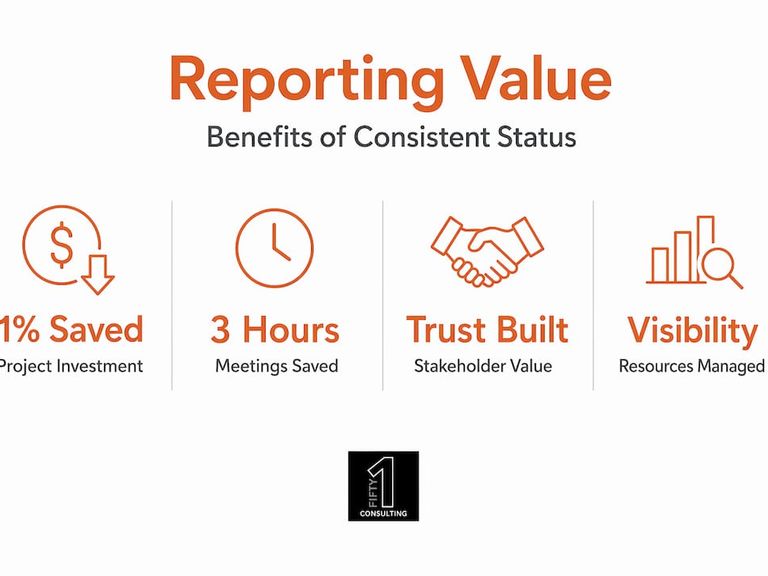
About 1% of total project investment is wasted due to poor performance and lack of clear visual reporting. On a $10 million program, that’s $100,000 in pure waste. Good reporting practices don’t just feel better. They protect budget.
The benefits stack up fast when you run a consistent, well-structured reporting process:
Stakeholder trust. When your stakeholders receive the same quality report at the same time every week, they stop worrying between updates. That confidence takes months to build and about two missed reports to destroy.
Faster decisions. When your report clearly states “we need a vendor approval by Thursday or QA slips two weeks,” decision-makers can act immediately. Ambiguity is what kills timelines, not complexity.
Fewer unnecessary meetings. Structured status updates save agencies approximately 3 hours weekly by replacing ad hoc check-ins with predictable, written communication. Three hours a week is 150 hours over a year-long project. That’s not small.
Team accountability. When blockers are named publicly in a written report, ownership becomes clear. Nobody wants their name next to a red status for two consecutive weeks.
Resource visibility. A good project communication plan paired with consistent reporting surfaces capacity issues before they derail your critical path. You see the gap coming instead of discovering it when someone misses a deadline.
My take: status reports are leadership tools, not paperwork
I’ve reviewed hundreds of status reports over the years. The pattern I keep seeing is that the worst ones come from the most technically capable teams. Not because those teams don’t know what’s happening. Because they assume everyone else does too.
A status report isn’t a paper trail for compliance. It’s how you lead when you’re not in the room. When a steering committee reviews your update at 7am before your project lands on the agenda, your report is doing the talking for you. If it’s a wall of text with no clear ask and a green light across every workstream, you’ve lost them before the meeting starts.
What I’ve found actually works: treat your report like a memo to a smart person who has no time and will only act on clear, specific asks. Write the six-sentence summary. Use the RAG table. State what you need and by when. That’s it.
The teams I’ve seen cut their stakeholder back-and-forth in half weren’t using fancier tools. They just stopped treating status reporting as an obligation and started treating it as their primary influence channel. That mindset shift changes everything.
, Kyle
Practice these skills before your next high-stakes update
Reading this guide is a start. Knowing how to report project status under real pressure, when a stakeholder is pushing back on your red flag or demanding an answer you don’t have yet, is a different skill entirely.

That’s exactly what DazIQ was built for. Fifty1consulting’s AI-powered simulation platform puts you in realistic project scenarios where you practice stakeholder communication, status framing, and escalation decisions in real time. Not passive reading. Not flashcards. Actual decision-making reps in environments that mirror the pressure of live delivery. Whether you’re prepping for your PMP, stepping into your first PM role, or trying to sharpen skills you’ve already built, DazIQ gives you the practice floor you don’t get from job experience alone. The closed beta is open now for motivated practitioners. Don’t wait for a bad project to teach you what a good status report looks like.
FAQ
What should a project status report include?
A solid status report covers project health (RAG status), what was completed since the last update, current work in progress, active blockers, risks, and specific decisions or approvals needed from stakeholders. Keep the executive summary to six sentences.
How often should you send project status reports?
For most technology projects, weekly is the right cadence. Bi-weekly works for slower initiatives. The key is consistency. Missing cycles erodes stakeholder trust faster than any individual piece of bad news.
What does “Done, Doing, Blocked, Needs” mean in reporting?
It’s a four-part structure for status reports that focuses on what changed since the last update, what’s actively in progress, what’s currently blocked and why, and what decision or resource is required to unblock work. It drives faster decisions than narrative-style reporting.
Why is “On track” a bad project status?
“On track” tells stakeholders that something is being measured without giving them any context about risk, blockers, or what would change that status. It’s the project management equivalent of “fine.” Use it only when paired with supporting context about what’s working and what risks exist.
How do you tailor a status report for different audiences?
Executives need high-level outcomes, budget health, and a clear ask. Technical teams need workstream-level detail, blocker specifics, and dependency flags. One report rarely serves both groups well. Consider a one-page summary layer with linked appendices for deeper detail.
Recommended
Working on a project that needs to land right? Let us take a look.
Book a discovery callAll engagements are flat-fee, no hourly surprises.